

Try this in the studio
Made with this guide
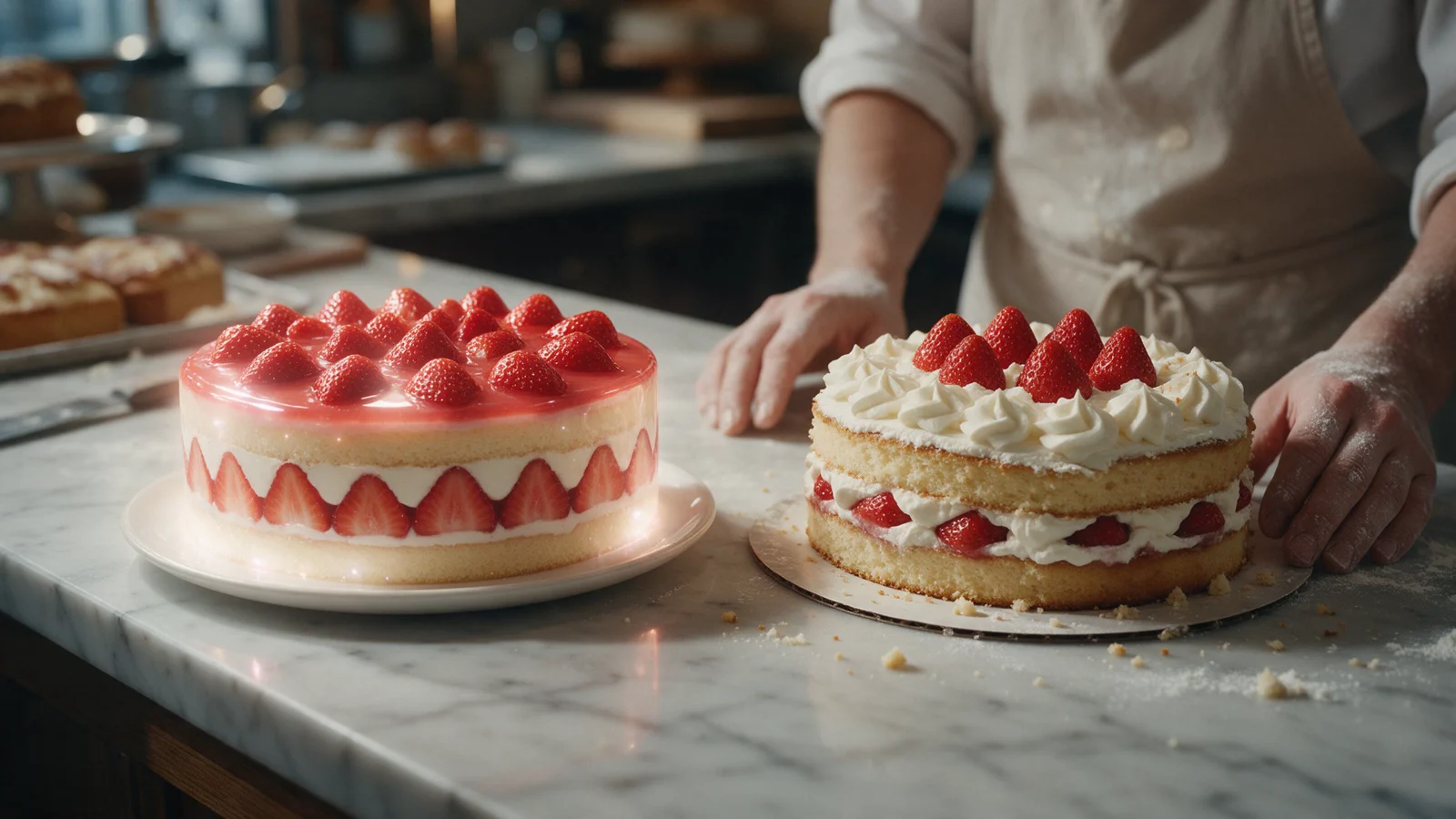
A new clip generated from this guide's prompt, unedited.
Prompt
Vertical phone video in two halves cut on the beat. First 4 seconds: an impossibly perfect glossy strawberry layer cake slowly spins on a white turntable in a dreamy studio with soft glowing light, flawless piped cream, it bounces gently up and down to a steady rhythm. Hard cut. Last 4 seconds: the real homemade version on a floury home kitchen counter, slightly lopsided with hand-piped cream and a few crumbs, a baker's hands give the plate a little bounce in the same rhythm and then a proud thumbs up. Warm natural light, realistic phone-camera look. Audio: a soft kitchen room tone with light rhythmic taps on the counter, no music.
How to make the AI vs Handmade clip
- 1
Film your real product first
Shoot 3 to 4 seconds of your real cake, bouquet, candle or mug on your phone, in 9:16. Give it a small bounce or a turn in time with a beat you count in your head.
- 2
Make the AI half on Seedance 2.5
Describe the same product as an impossibly perfect version: glossy, flawless, glowing, on a clean studio set. Ask for a gentle bounce "to a steady rhythm" so it cuts well with your clip.
- 3
Or make both halves in one go
Seedance 2.5 can do the whole joke in one clip with a hard cut in the middle, like the example on this page. Your own real footage is funnier, though: that is the point of the trend.
- 4
Cut on the beat
Put the AI half first and the real half second in the free video editor, cut exactly on a beat, and keep the whole video under 10 seconds.
- 5
Add the sound and post
Add the trending sound inside TikTok, Instagram or YouTube when you post: the app licenses it there. Don't put copyrighted music into the clip yourself. Say in the caption which half is AI.
AI vs Handmade prompts
Paste one into the video studio on Seedance 2.5. Swap the product for yours.
Strawberry cake (the clip on this page)
Vertical phone video in two halves cut on the beat. First 4 seconds: an impossibly perfect glossy strawberry layer cake slowly spins on a white turntable in a dreamy studio with soft glowing light, flawless piped cream, it bounces gently up and down to a steady rhythm. Hard cut. Last 4 seconds: the real homemade version on a floury home kitchen counter, slightly lopsided with hand-piped cream and a few crumbs, a baker's hands give the plate a little bounce in the same rhythm and then a proud thumbs up. Warm natural light, realistic phone-camera look. Audio: a soft kitchen room tone with light rhythmic taps on the counter, no music.
Flower bouquet (AI half only)
Vertical video, 4 seconds. An impossibly perfect bouquet of pastel peonies and ranunculus, every petal flawless and glowing softly, slowly turns on a white pedestal in a dreamy studio with drifting light particles, and bounces gently up and down to a steady rhythm. Static camera. Audio: soft room tone, no music.
Hand-thrown mug (AI half only)
Vertical video, 4 seconds. A perfectly smooth glossy ceramic mug in deep ocean blue with an impossibly even glaze spins slowly on a floating marble plinth, steam curling from fresh coffee, soft studio light, and the mug hops gently to a steady rhythm. Static camera. Audio: soft room tone, no music.
What it costs on Seedance 2.5
Seedance 2.5 credits by clip length and resolution, with generated audio. From the studio's own credit code. 4K comes with Pro, Max and Business.
| Clip length | 720p | 1080p |
|---|---|---|
| 5 s | 24 credits | 50 credits |
| 8 s | 38 credits | 80 credits |
| 10 s | 47 credits | 100 credits |
Sources, as checked:
- SocialPilot, TikTok trends for 27 Oct to 10 Nov 2026 (read 9 Nov 2026): socialpilot.co/blog/tiktok-trends
- Anijam, "TikTok Trends November 2026" (read 9 Nov 2026): anijam.ai/blog/tiktok-trends/
Seedance price per second on KreatorFlow
Seedance 2.0 and 2.5 at 720p and above: price per second on each plan (monthly and annual), credits per 5-second clip, and clips per plan.
| Model · resolution | Credits | Per second | USD per second (monthly) | USD per second (annual) | Creator · 525 credits/mo | Pro · 1,050 credits/mo | Max · 2,500 credits/mo | Business (2 seats) · 4,500 credits/mo |
|---|---|---|---|---|---|---|---|---|
| Seedance 2.0 · 720p | 15/5s | 3/s | $0.119–0.145/s | $0.099–0.121/s | 35 | 70 | 166 | 300 |
| Seedance 2.0 · 1080p | 30/5s | 6/s | $0.238–0.289/s | $0.198–0.241/s | 17 | 35 | 83 | 150 |
| Seedance 2.0 · 4K | 70/5s | 14/s | $0.554–0.675/s | $0.462–0.563/s | Pro and up | 15 | 35 | 64 |
| Seedance 2.5 · 720p | 24/5s | 4.8/s | $0.190–0.231/s | $0.158–0.193/s | 21 | 43 | 104 | 187 |
| Seedance 2.5 · 1080p | 50/5s | 10/s | $0.396–0.482/s | $0.330–0.402/s | 10 | 21 | 50 | 90 |
| Seedance 2.5 · 4K | 120/5s | 24/s | $0.950–1.157/s | $0.792–0.964/s | Pro and up | 8 | 20 | 37 |
Seedance 2.0 and 2.5, 720p and above. Plan columns: 5-second clips a month on the plan's full monthly credits. Longer clips cost the same per second, so a 10-second clip uses twice the credits. Generated audio is included. USD per second: each plan's price over its full monthly credits, lowest to highest plan; monthly is the regular monthly price, annual is the yearly price divided by 12.
What is the AI vs Handmade trend?
A self-aware format for makers: first the glossy AI version of a product, then the real handmade one, both bouncing to the same beat. SocialPilot's list for 27 October to 10 November 2026 names it as an "AI vs. Handmade" bounce set to the "Dame Hombro" beat and suggests it for bakeries, florists and craft brands.
The sound itself grew from a street freestyle by Bulin 47 and Kevin Wai and became a song released on 7 October, according to Anijam. SocialPilot counted 184K videos on it and rated it as rising.
Why it works for small businesses
It turns the "is it AI?" question into the joke. The AI half shows the dream; the real half shows the care, the crumbs and the person behind it. Viewers tend to side with the handmade one, which is good for a small brand.
Keep the real half honest: don't edit it to look like the AI one. The contrast is the whole video.
Say which half is AI
Label the AI half in the caption or with the platform's AI tag. Never use the AI half to show a product that you then sell as if it looked like that.