Official BytePlus partnerBuilt on BytePlus, ByteDance's official AI platform
Style
Cyberpunk AI generator
The Cyberpunk style drops your prompt into a rainy neon city at night: glowing magenta and cyan signs, wet reflective streets, haze and holographic details with hard contrast.
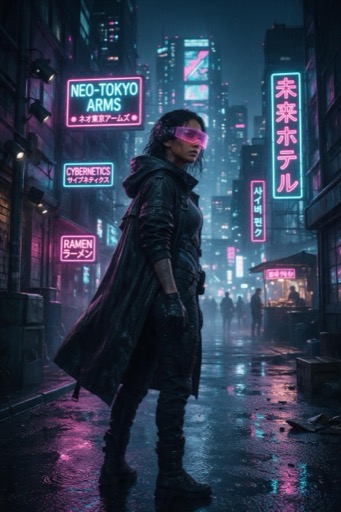
What the style does
Neon-lit night cities, rain-slick streets and magenta-and-cyan glow. The Cyberpunk style in the image and video studios.
Good for
- Music visuals and album art
- Gaming and tech promos
- Moody character portraits
Example prompt
Type this in the studio with Cyberpunk selected:
A courier on a motorbike waiting at a red light, rain, holographic ads above the street
Prompt tips
- Add rain or steam so the neon has something to reflect in
- Name the signage: noodle bar, pawn shop, hologram ad
- Put the subject under one strong coloured light
Where you can use it
- Image studio: pick Cyberpunk in the style picker. It works with whichever image model you choose.
- Video studio: pick Cyberpunk in the art-style picker. The look is applied while the clip is generated.
How to use it
- 1
Open a studio
Go to the image studio for pictures or the video studio for clips.
- 2
Pick Cyberpunk
Choose Cyberpunk in the style picker. The preview tile shows the look.
- 3
Write your prompt
Describe the subject and scene in your own words. The style adds the look on top; your text is never replaced.
- 4
Generate
The credit cost is shown before you generate, and it is the same with or without a style.
What it costs
A style is free to use: it only changes the prompt, so the price is the normal price of the generation.
For example, one Seedream 4.5 image is 2 credits and a 5-second Seedance 2.0 clip at 720p is 15 credits, with or without a style.
Questions
Can I use Cyberpunk on a video clip?
Yes. Pick it in the video studio's style picker. It works best with a reference image that already has a night or city setting.
Does a style cost extra credits?
No. A style only adds words to the prompt that is sent, so you pay the normal price: for example 2 credits for a Seedream 4.5 image.
Does the style replace my prompt?
No. Your prompt stays exactly as you wrote it. The style is added on top to set the look.
Can I switch styles on the same prompt?
Yes. Keep the prompt, pick a different style and generate again to compare looks side by side.
Try the Cyberpunk style
Open the image studio, pick the style and write your prompt. New accounts get free starter credits.