Official BytePlus partnerBuilt on BytePlus, ByteDance's official AI platform
Style
3D animation style AI generator
The 3D animation style renders your prompt like a frame from an animated feature: rounded stylised characters, smooth skin with a soft glow, warm global light and crisp detail.
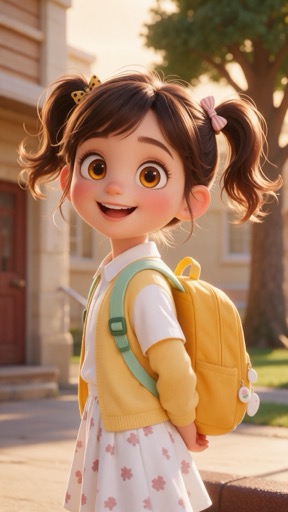
What the style does
Glossy 3D animated-film look: stylised characters, soft studio light and smooth rendered skin. Pick the 3D style in the image or video studio.
Good for
- Family-friendly characters and mascots
- Toy and product concepts
- Storybook scenes for short videos
Example prompt
Type this in the studio with 3D animation selected:
A tiny robot gardener watering a single sunflower on a windowsill, morning light
Prompt tips
- Describe the character's age and mood, not just the species
- Add a warm practical light, like a lamp or a fireplace
- Ask for a slightly low camera to make characters feel heroic
Where you can use it
- Image studio: pick 3D animation in the style picker. It works with whichever image model you choose.
- Video studio: pick 3D animation in the art-style picker. The look is applied while the clip is generated.
How to use it
- 1
Open a studio
Go to the image studio for pictures or the video studio for clips.
- 2
Pick 3D animation
Choose 3D animation in the style picker. The preview tile shows the look.
- 3
Write your prompt
Describe the subject and scene in your own words. The style adds the look on top; your text is never replaced.
- 4
Generate
The credit cost is shown before you generate, and it is the same with or without a style.
What it costs
A style is free to use: it only changes the prompt, so the price is the normal price of the generation.
For example, one Seedream 4.5 image is 2 credits and a 5-second Seedance 2.0 clip at 720p is 15 credits, with or without a style.
Questions
Does the 3D style copy a specific studio's characters?
No. It sets a general 3D animated-film look. Describe your own original characters; KreatorFlow's acceptable use policy does not allow content that infringes copyright or trademarks.
Does a style cost extra credits?
No. A style only adds words to the prompt that is sent, so you pay the normal price: for example 2 credits for a Seedream 4.5 image.
Does the style replace my prompt?
No. Your prompt stays exactly as you wrote it. The style is added on top to set the look.
Can I switch styles on the same prompt?
Yes. Keep the prompt, pick a different style and generate again to compare looks side by side.
Try the 3D animation style
Open the image studio, pick the style and write your prompt. New accounts get free starter credits.